AI assistant settings
Turn the AI assistant on for your organisation, choose which AI model answers, set a monthly budget and how long questions are kept, and review what people asked.
Before you start
- Needs the Administrator role (Enable AI, choose the provider and set budgets and retention; the request log needs Review the AI request log).
- Decide whether your organisation accepts that questions and data excerpts may be sent to an external AI service.
- Time needed: about 5 minutes.
Turn the assistant on
Open Administration → System → AI assistant.
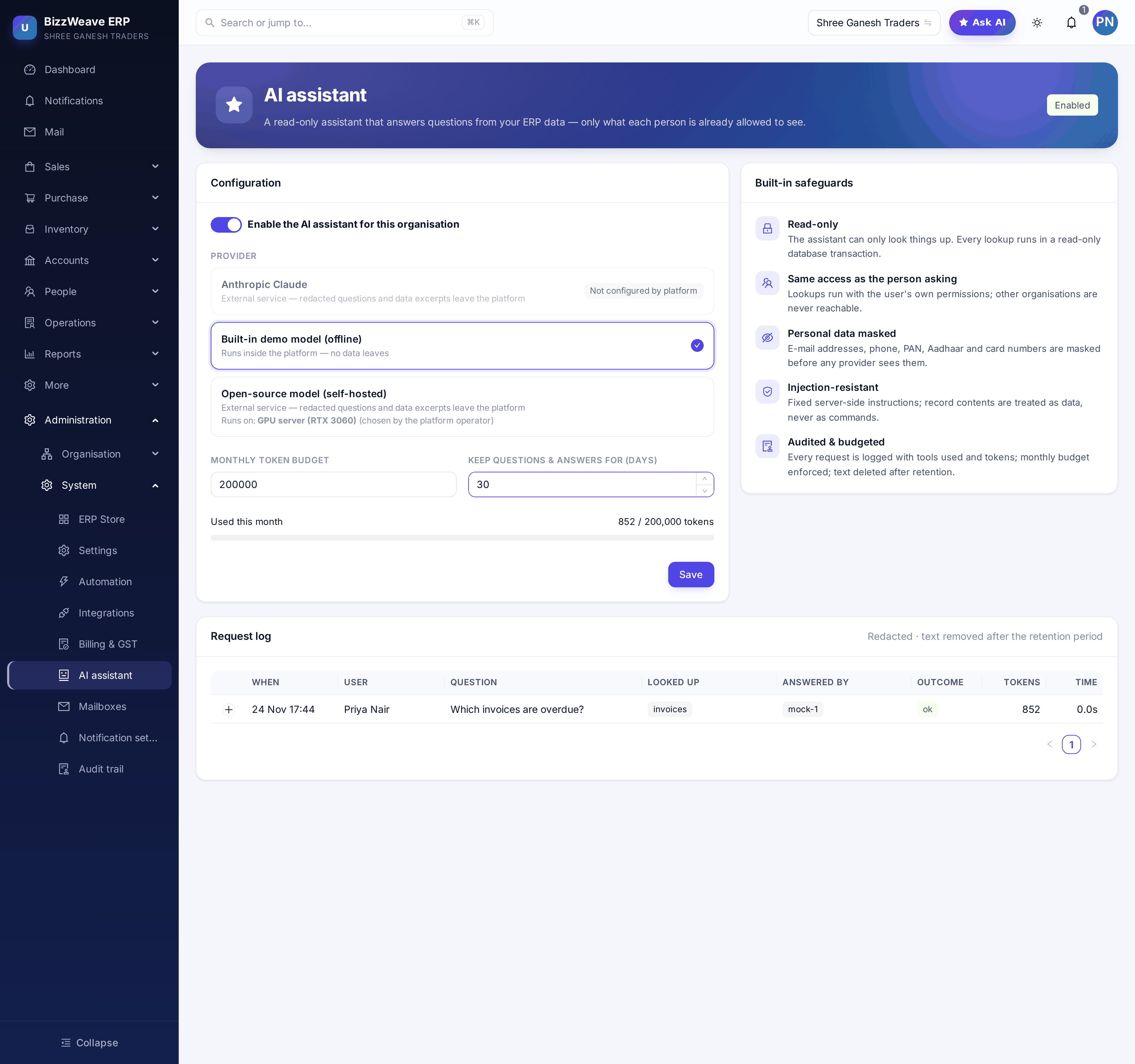
- Switch on Enable the AI assistant for this organisation.
-
Choose a Provider. Only providers the platform operator has set up can be chosen; the others are marked Not configured by platform.
Provider Where it runs Built-in demo model (offline) Inside the platform; no data leaves. Answers are short and plainly worded. Good for trying the assistant. Open-source model (self-hosted) An open-source model on a server run by the platform operator (the card shows which, for example a GPU server). Anthropic Claude An external AI service. For providers marked External service — redacted questions and data excerpts leave the platform, you must tick the confirmation that your organisation accepts this before you can save.
-
If the provider offers several models, choose the Model.
- Set the Monthly token budget. Tokens measure how much text the AI reads and writes; a typical question uses a few hundred to a few thousand. When the budget is used up, people see a message until next month.
- Set Keep questions & answers for (days): 1 to 365. After that, the text of questions, answers and chats is deleted.
- Click Save. The message AI settings saved appears, and the change is recorded in the audit trail.
Used this month shows the tokens used against the budget; the bar turns red above 90 %.
Built-in safeguards
Whatever provider you choose, the assistant:
- is read-only: every look-up runs in a read-only database transaction;
- has the same access as the person asking: it can never see more than they can, nor other organisations;
- masks personal data (e-mail addresses, phone, PAN, Aadhaar and card numbers) before any provider sees it;
- is injection-resistant: its instructions are fixed on the server, and record contents are treated as data, never as commands;
- is audited and budgeted: every request is logged with the areas looked up and the tokens used.
The request log
The Request log lists every question: when, who asked, the question, what was Looked up, which model Answered by, the Outcome (ok, refused, error or limited), tokens and time. Click a row to see the answer. After the retention period the text is removed and shows removed.
If the assistant is paused
If the platform changes where an external provider runs, the page shows The assistant is paused until you accept external processing. Read the reason, tick the confirmation and click Save to resume.
People ask questions with Ask AI; see Ask AI.