Ask AI
The AI assistant answers questions in plain English, such as “Which invoices are overdue?” or “Where do I approve leave requests?”. It looks the answer up in your own organisation's data and shows the records it used. It can only read: it never changes anything.
Before you start
- An administrator must turn the assistant on for your organisation. See AI assistant settings.
- Your role needs the Ask the read-only AI assistant permission. Administrators, members and viewers have it; managers get it only through a custom role in the current release.
- Time needed: seconds per question.
Ask a question
-
Click Ask AI in the top bar, or press Ctrl+J (Cmd+J on a Mac). The assistant opens on the right.

Suggested questions appear for the areas you can use. Click one to ask it. -
Type your question in the box at the bottom and press Enter (Shift+Enter for a new line). Questions can be up to 2,000 characters.
- Wait while it shows Thinking…. Most answers come in seconds; on a busy server it can take up to a minute. You can close the panel meanwhile: the answer is kept.
-
Read the answer.

The answer is labelled AI-generated. Sources links to the records used; Looked up shows which areas were searched. -
Click a link under Sources to open the record and check it. Ask a follow-up question in the same chat if you need more.
Check before you act
AI-generated answers can be wrong. Always check the linked records before you act on an answer, for example before you phone a customer about an overdue invoice.
What it can and can't do
| It can | It can't |
|---|---|
| Explain how to do something in BizzWeave ERP, for example how to turn a quotation into an order. | Change, create or delete anything. Every look-up is read-only. |
| Look up your data: tasks, projects, tickets, invoices, expense claims, stock, purchase orders, quotations and orders, customers, leave, attendance, documents and what is waiting for your approval. | See anything you aren't allowed to see. It works with your permissions only. |
| Give a dashboard overview, a financial summary and simple forecasts (sales, stock-outs, payment risk). | See other organisations' data, ever. |
| Remember the chat so you can ask follow-up questions. | Read e-mails, the internet or files outside BizzWeave ERP. |
Where the answers come from
- Your own data. The assistant looks up records in your organisation, as you, and builds the answer from them. The Sources links show exactly which records.
- Personal data is masked. E-mail addresses, phone numbers, PAN, Aadhaar and card numbers are hidden before the question and the excerpts reach the AI model.
- Your administrator chooses the AI model. It may run inside the platform, or be an external service that your organisation has approved. See AI assistant settings.
- Everything is logged. Each question, the areas looked up and the tokens used are recorded for administrators, and the text is deleted after the retention period.
Your chats
Chats are saved so you can come back to them.
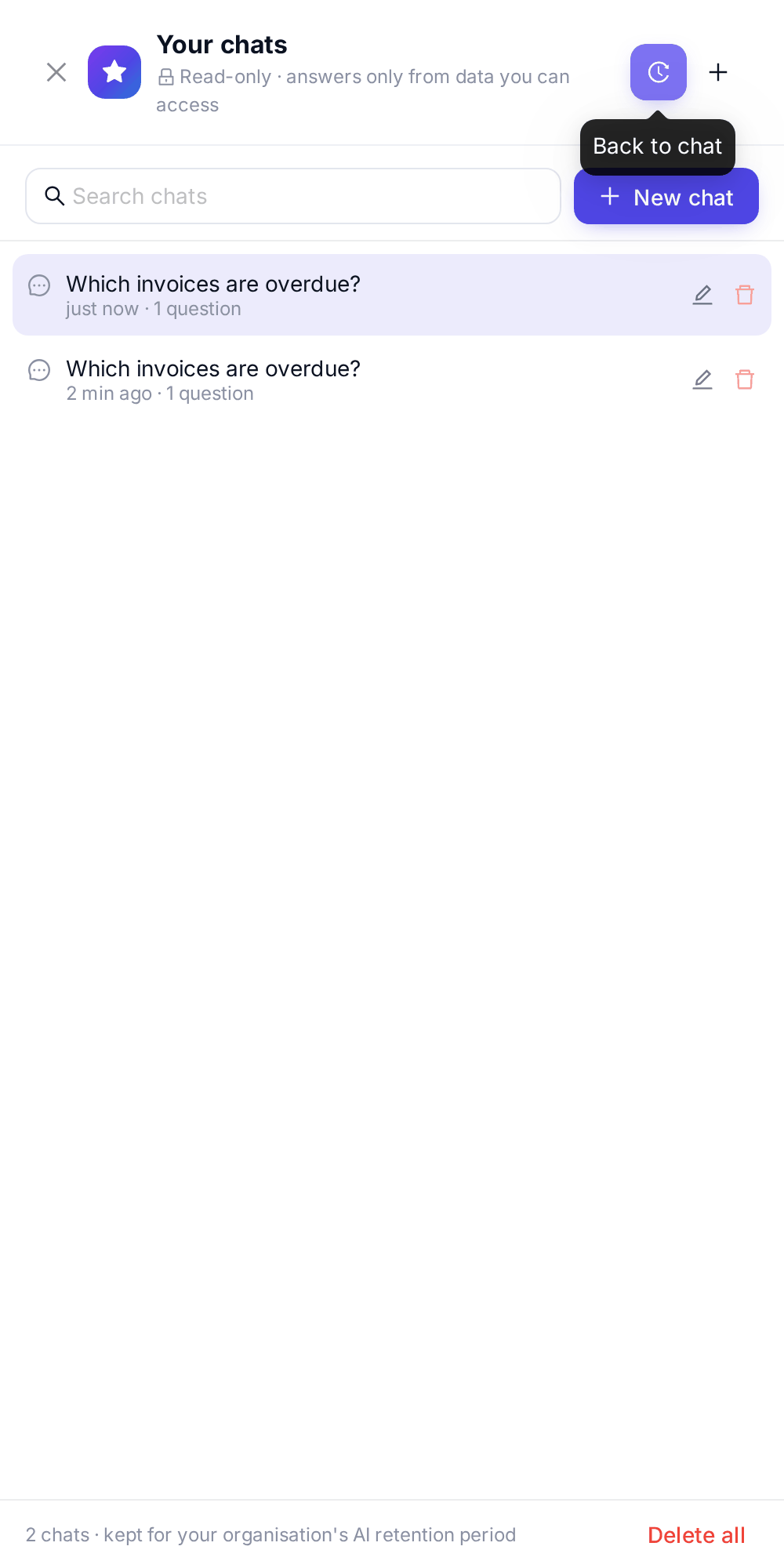
- Click the clock icon (Chat history) at the top of the panel to see Your chats. Search them, click one to continue it, rename it with the pencil or delete it with the bin. Delete all removes every chat.
- Click + (New chat) to start fresh.
- Chats are private to you and are deleted after your organisation's AI retention period.
Common questions
“AI is turned off for your organisation.”
An administrator hasn't enabled the assistant yet. Administrators see a link to Settings → AI assistant.
“The assistant is paused for your organisation.”
The administrator must confirm (again) that data may be sent to the chosen external AI provider. Ask them to review AI assistant settings.
“Your organisation has used its AI allowance for this month.”
The monthly budget is used up, or the assistant is busy. Try again shortly, or ask an administrator to raise the Monthly token budget. The small circle at the bottom right of the panel shows how much has been used.
It says it can't answer, or the answer is “declined”.
The question may be about something your role can't see, or about something outside BizzWeave ERP. Rephrase it, or open the page yourself.
Is this the same as the AI assistant in Project Management?
No. Planning & control → AI assistant in Project Management proposes plans and changes for projects, which someone reviews before they are applied. See the Project Management guides.