Keyboard shortcuts and the command palette
A few keys let you jump to any page or ask the AI assistant without touching the mouse.
Shortcuts
On a Mac, use Cmd instead of Ctrl.
| Keys | Where | What it does |
|---|---|---|
| Ctrl+K | Anywhere | Opens the command palette (Search or jump to…). |
| Ctrl+J | Anywhere | Opens or closes the Ask AI assistant. |
| Up Down | Command palette | Move through the results. |
| Enter | Command palette | Open the highlighted page. |
| Esc | Palette, dialogs, drawers | Close without changes. |
| Enter | Ask AI | Send your question. Shift+Enter starts a new line instead. |
| Ctrl+B / Ctrl+I | Text editors with a toolbar (comments, descriptions) | Bold / italic. |
| Ctrl+K | Inside such a text editor | Insert a link. |
| Ctrl+Enter | Inside such a text editor | Post or save, where the editor has a send button. |
| Tab / Enter | Project boards and the Project home cards | Move to a card and open it. |
The command palette
The command palette is the quickest way to reach a page you know by name.
- Press Ctrl+K, or click Search or jump to… at the top of any page.
-
Type a few letters, for example
inv. The palette searches page names and related words, soinvfinds Invoices, and also Stock and Warehouses (inventory).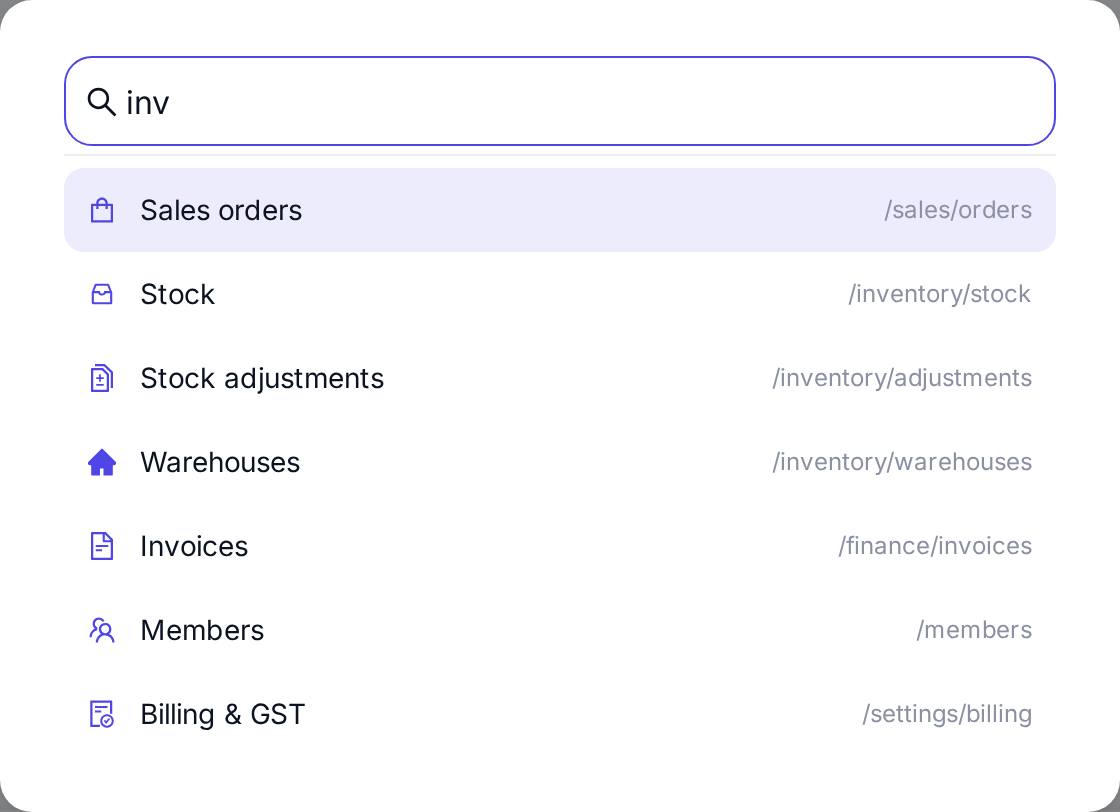
Each result shows the page name and its address. Up to ten results are shown. -
Press Enter to open the first result, or use the arrow keys or the mouse to pick another.
The palette lists only pages your role can open, from every category your organisation uses. If the page belongs to another category, the menu switches to it. More in Search and the command palette.