A day in a CA office
Follow the team of Mehta & Associates, a Pune CA firm, through a normal working day in late November, when October's GST returns are just past due and ROC season is ending. Each step links to the guide that explains it in detail.
The people in this example
- Priya Nair (partner and owner) reviews income tax, ROC and audit work and handles billing.
- Rahul Verma (manager) reviews GST and TDS work and sends client e-mails.
- Sneha Kulkarni, Arjun Mehta and Kavya Reddy (staff) prepare and file the returns.
9:30 Priya checks the dashboard
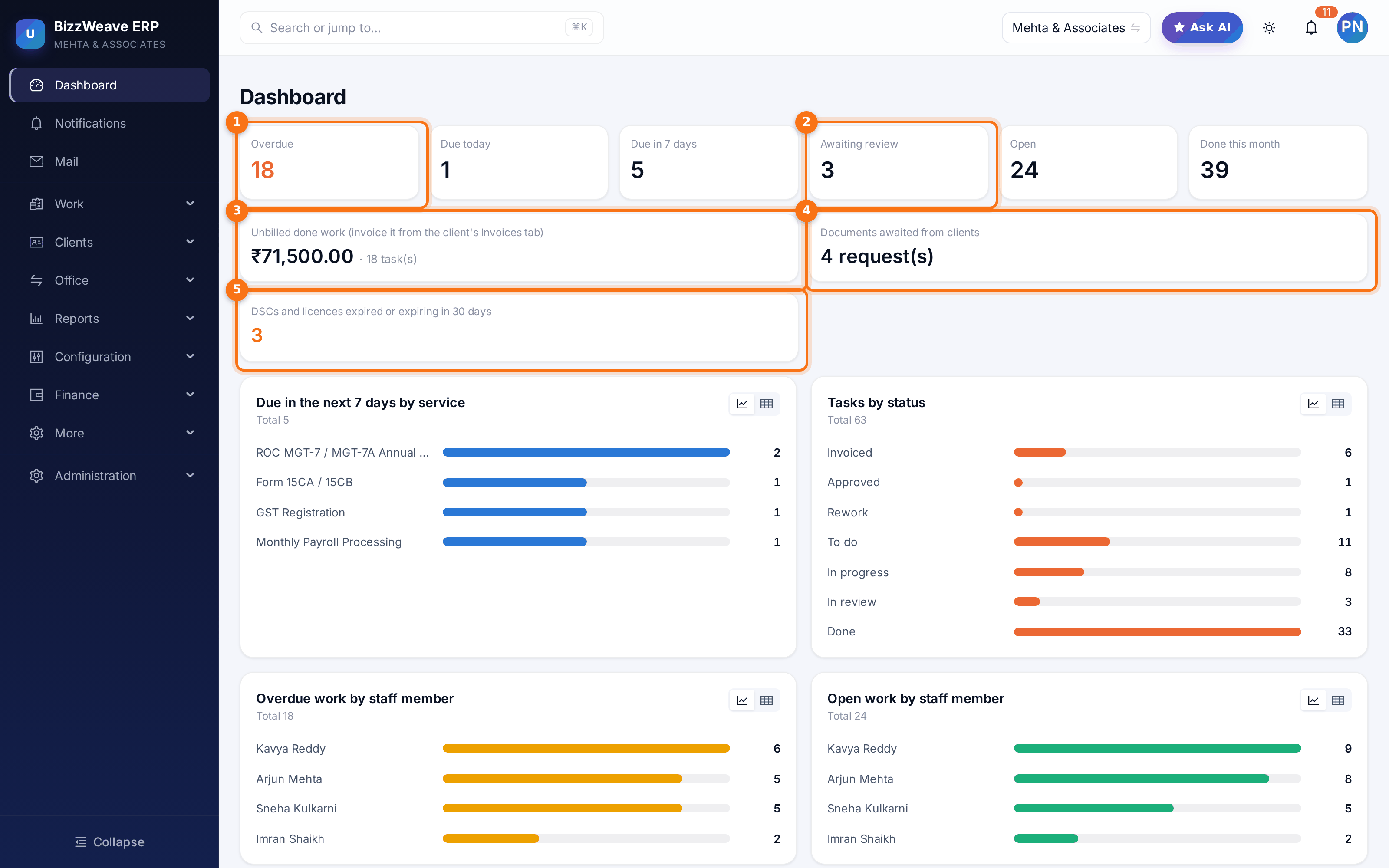
Priya opens BizzWeave ERP. The Dashboard shows 18 overdue tasks in red, 1 due today, 5 due in 7 days and 3 awaiting review. Below, ₹71,500 of finished work is not billed yet, 4 document requests are still with clients, and 3 DSCs or licences expire within 30 days. The chart Overdue work by staff member shows Kavya has the most overdue work. → The dashboard
9:45 Reviews first
Priya clicks Awaiting review. The ITR of Patel & Associates is waiting for her. She opens it, reads Kavya's comment (Computation shared with Suresh bhai; he approved it on the call today), checks the computation and clicks Approve.
Rahul does the same for the GST returns. He finds that the GSTR-3B of Sharma Logistics LLP claims input tax credit for two supplier invoices that are missing in GSTR-2B, so he clicks Send back and writes what to fix. Sneha gets a notification at once. → Review and filing
10:00 Each person works their list
Sneha opens Work → Compliance tasks, clicks My tasks and the Overdue tile. She starts with the Sharma Logistics return Rahul sent back: the yellow note tells her what to change. She clicks Start, corrects the ITC, ticks the checklist and clicks Send for review again. → Compliance tasks
Arjun's GSTR-3B for Iyer Medical Stores is still To do: the client hasn't sent the purchase register. → next step.
10:30 Chase missing documents
Arjun opens Work → Document requests. His request Purchase register and bills for October to Iyer Medical Stores shows 1/3 accepted: the register came in, the supplier invoices and credit notes didn't. He clicks Copy message for the client and pastes it into WhatsApp to Ramesh Iyer. When the PDFs arrive he clicks Received, attaches them and then Accept. → Document requests
12:00 File and record the ARN
The GSTR-3B of Patel & Associates was approved yesterday. Sneha files it on the GST portal, opens the task, clicks Mark done and enters the ARN AA2411264021455 and today's date. The task leaves the overdue list and its ₹2,000 fee joins the client's unbilled work. → File and mark done
14:00 A client drops in
Srinivas Rao brings two box files of bills for the tax audit. Arjun records them in Office → Register in / out as IN, hard copy, Original, with the further action Return after the tax audit. → Register in / out
Kavya notices on Office → DSC & expiry that Rajesh Sharma's DSC expires in 12 days, before the MGT-7 for Sharma Textiles can be filed. She calls the client to arrange the renewal; when the new token arrives she will click Renew. → DSC & expiry
15:00 Plan the coming days
Rahul opens Work → Calendar. The coming week has two MGT-7 returns on the 29th, the Desai Infotech payroll on the 30th, and a GST hearing for Patel & Associates that Priya added as an event. He moves one of Kavya's tasks to Arjun with Edit on the task to spread the load. → The calendar
16:00 Remind clients about November's GST
GSTR-3B for November is due on 20 December. Sneha opens Clients → Email broadcasts, clicks New broadcast, picks the template GSTR-3B due-date reminder and chooses Clients who take GSTR-3B Monthly Filing and GSTR-3B Quarterly Filing (QRMP): 8 clients, 9 e-mails. She saves the draft and asks Rahul, who clicks Send now. → Email broadcasts
17:30 Bill the finished work
Priya opens Iyer Medical Stores → Invoices. The September GSTR-1 and GSTR-3B are done and unbilled: ₹3,500. She clicks Create invoice, chooses GST 18% and clicks Create draft invoice, then opens it in Finance and clicks Issue. For the retainer client Desai Infotech she clicks Invoice retainer for November. → Billing
Month end: look back
On the last working day Priya opens Reports → Reports, chooses This month and looks at the on-time rate By staff, then exports the report for the partners' meeting. → Reports
The rhythm that keeps a CA office on time
- Every morning: dashboard, then reviews, then your own My tasks → Overdue.
- Before starting a return: request the documents you need from the client.
- The same day you file: Mark done with the ARN, so reports stay accurate and the work can be billed.
- Every week: check the calendar and the DSC register.
- Every month: bill finished work and retainers, and look at the reports.