CA Firm ERP
Practice management for chartered-accountant firms. Keep every client in one place, let the ERP create the recurring GST, income tax, TDS and ROC work, collect documents from clients, track DSC expiry and bill for the work you finish.

How a CA firm works in BizzWeave ERP
The usual flow, from a new client to a paid invoice:
New to the ERP? Read A day in a CA office first. It follows the team of the example firm Mehta & Associates through a normal day and links to every guide.
Modules
The menu groups the modules in the same way as the cards below: Work, Clients, Office, Reports and Configuration. Invoices are created from each client's page and finished in Finance.
Dashboard
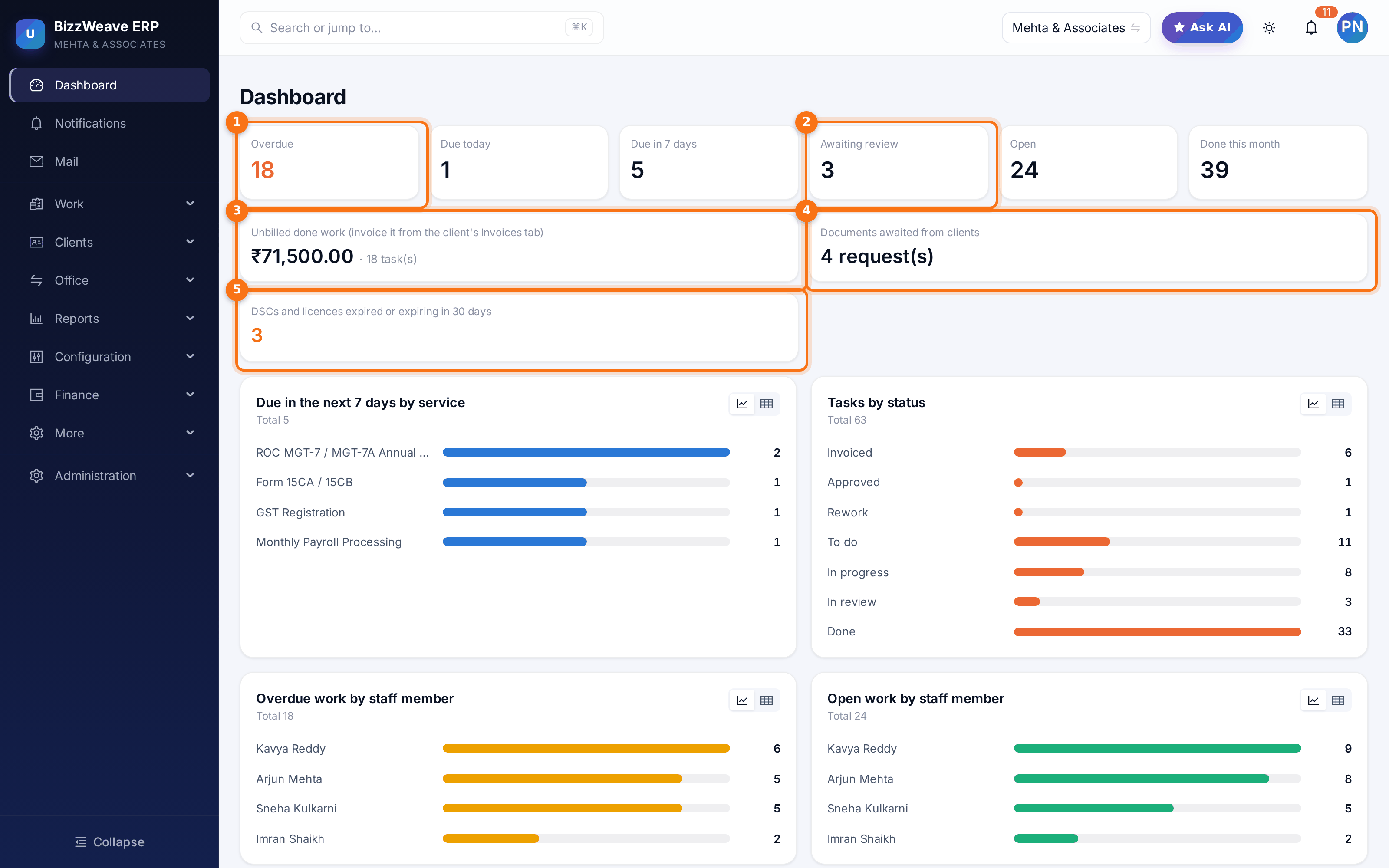
Overdue work, tasks due today and this week, work waiting for review, unbilled work and expiring DSCs.
Compliance tasks
Every GST, ITR, TDS and ROC job, with due dates, staff, reviewer and status.
Inside a task
Checklist, sub-tasks, files, documents from the client, people and comments.
Review and filing
From To do to Done: send for review, approve or send back, and record the ARN.
Calendar
Due dates of every task and your own events, such as hearings and client meetings.
Document requests
Ask clients for documents and see what is still pending.
Clients
Add clients, keep their tax identifiers, contacts and services, and archive clients who leave.
Client groups
Link related clients, such as a family or a business group.
Email broadcasts
Send one e-mail to many clients, for example a due-date reminder.
Register in / out
Record original documents that come into or leave the office.
DSC & expiry
Digital signature certificates and licences, with reminders before they expire.
Reports
On-time delivery, turnaround time and work done by service, client and staff member.
Services
The service catalogue: prices, due-date rules and the task template of each service.
CA settings
Custom fields for clients, tasks and DSCs, and the colours of client tags.
Billing
Invoice finished work per service, or bill a retainer for a period.
Questions
Short answers to what new CA ERP users ask most.
Who can do what
What you can do depends on the role your administrator gave you.
| Role | What the role can do in CA Firm ERP |
|---|---|
| Owner / administrator | Everything, including archiving clients, CA settings, reopening done tasks, reviewing any task and Create due tasks now. |
| Manager | Add and edit clients and services, work on and review tasks, send e-mail broadcasts, see reports and billing figures, and create invoices. |
| Member (staff, articles) | See all clients (PAN, GSTIN and DIN partly hidden), work on compliance tasks, request documents, keep the registers and write broadcast drafts. Members can't add clients, change prices, send broadcasts or see invoices. |
| Viewer | See clients, tasks, document requests and registers, without changing anything. |
The reviewer is always someone else
The ERP never lets a person approve their own work. The reviewer of a task must be a different person from the staff member who prepares it.
The CA ERP dashboard
When you open BizzWeave ERP in an organisation with CA Firm ERP, the Dashboard shows the firm's work at a glance: overdue tasks, tasks due today and this week, work waiting for review, unbilled finished work, documents still awaited from clients, and DSCs or licences expiring soon. → The dashboard