Sales pipeline
Track every deal you are working on, from the first enquiry to won or lost, and see how much business is in the pipeline.
Before you start
- Where: Sales → Sales pipeline.
- Everyone can see the pipeline. Members, managers and administrators can add opportunities and move them between stages.
- The customer must exist as a company (a prospect or customer). See Customers.
- Time needed: 1 minute per opportunity.
An opportunity is a possible sale: what the customer may buy, how much it is worth, how likely you are to win it (probability) and when you expect to close it.
The pipeline board
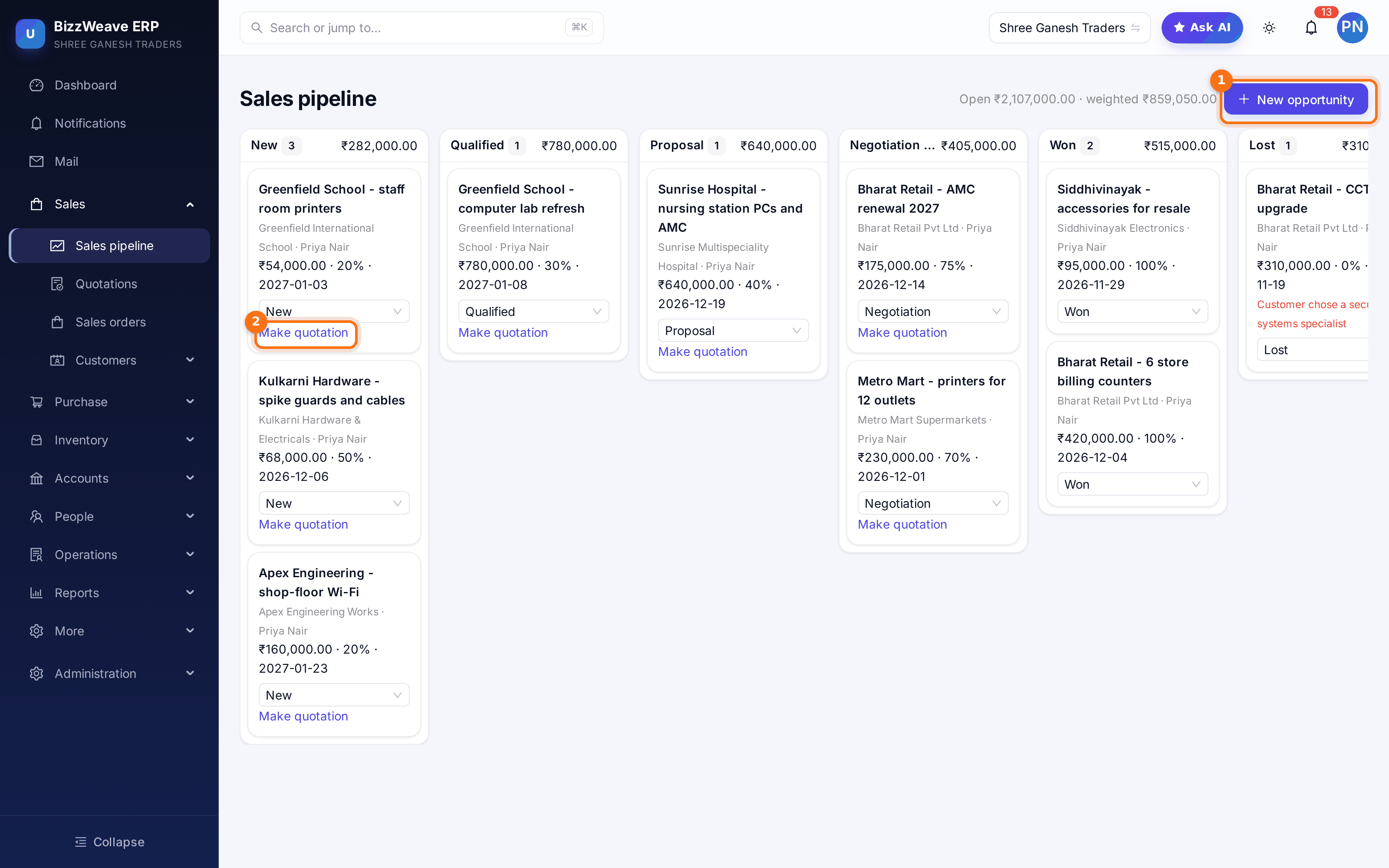
The board has a column for each stage: New, Qualified, Proposal, Negotiation, Won and Lost. Each column shows how many opportunities it holds and their total value. At the top right you see the Open total (all stages except Won and Lost) and the weighted total (each value times its probability).
Each card shows the title, customer, owner, value, probability and expected close date. A lost card also shows the reason in red.
Add an opportunity
-
Click “New opportunity”.

A new opportunity for barcode scanners. -
Fill in the details.
Field What to enter Example Title Required. A short name for the deal. Metro Mart - barcode scanners for 12 outlets Customer Required. The company. Metro Mart Supermarkets Value The expected order value in ₹. 96,000 Probability % How likely you are to win it (starts at 20). 40 Expected close When you expect a decision. 15 Dec 2026 Notes Anything useful. Wants a demo first -
Click “OK”. The opportunity appears in the New column.
Move an opportunity through the stages
Use the stage box on the card to move it, for example from New to Qualified when you have confirmed the need and budget.
- Choosing Lost asks Why was it lost? A reason is required. It shows on the card, for example Customer chose a security-systems specialist.
- A Won or Lost opportunity is closed. To change its details, first move it back to an open stage.
The pipeline moves by itself
When you send a quotation made from an opportunity, the opportunity moves to Proposal. When the customer accepts the quotation, it moves to Won.
Make a quotation from an opportunity
Click Make quotation on an open card. A new quotation opens with the customer filled in and linked to the opportunity. Continue in Quotations.
What is the weighted pipeline?
The sum of each open opportunity's value times its probability. ₹2,30,000 at 70% counts as ₹1,61,000. It also appears on the Business overview.