Manage IT assets
The asset register is one list of every laptop, desktop, server, network device, phone, printer and software licence the company owns: who has it, where it is, and when its warranty or subscription ends.
Before you start
- Everyone in the organisation can see the register. Registering and updating assets needs the Register and update IT assets permission (managers and owners). Disposing of an asset needs Dispose of IT assets (owners and administrators).
- Have the device's serial number, purchase date, price and warranty end date at hand (they are on the invoice).
- To choose a Vendor, the supplier must exist under Customers → Companies.
- Time needed: about 3 minutes per asset.
The asset register
Open Assets → IT assets.
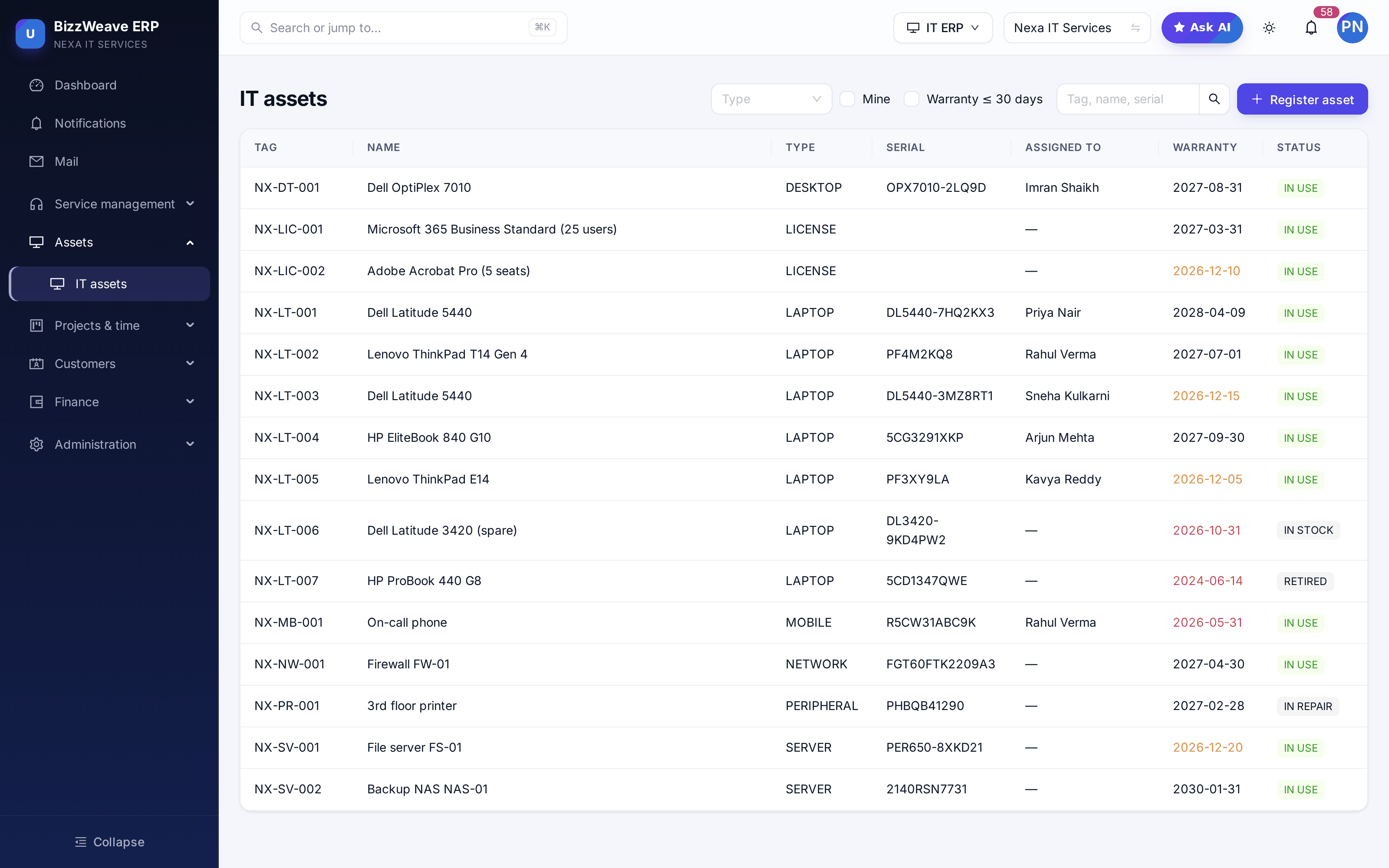
| Column | What it shows |
|---|---|
| Tag | Your own label for the asset, the one on the sticker, for example NX-LT-003. |
| Name, Type, Serial | What it is. Types: Laptop, Desktop, Server, Network, Mobile, Peripheral, License and Other. |
| Assigned to | The person who has it, or —. |
| Warranty | The date the warranty (or, for a licence, the subscription) ends. |
| Status | In stock, In use, In repair, Retired, Disposed or Lost. |
Use the controls above the list to narrow it down:
- Type: show one kind of asset, for example only licences.
- Mine: only the assets assigned to you.
- Warranty ≤ 30 days: only assets whose warranty ends in the next 30 days.
- Tag, name, serial: type part of a tag, name or serial number and press Enter.
Register an asset
-
Click “Register asset” at the top right.

1 The Register asset button. -
Fill in the form.
Field What to enter Example Asset tag (required) A unique label. Letters, digits and . _ / -only; it's saved in capitals.NX-LT-008 Type (required) The kind of asset. LAPTOP Status Leave it on auto: the asset becomes In use if you assign it to someone, otherwise In stock. auto Name (required) What people call it. Lenovo ThinkPad T14 Gen 5 Model Make, model and configuration. ThinkPad T14 Gen 5 (i7, 32 GB) Serial number The manufacturer's serial number. It must be unique. PF5K8MZ2 Vendor The supplier, chosen from Customers → Companies. Sahyadri Computers Private Limited Assigned to The person who will use it. Kavya Reddy Location Where it is kept. Pune office, Baner Purchased, Cost Purchase date and price in ₹. 2026-11-24, 118500 Warranty ends The last day of the warranty or, for a licence, the renewal date. 2029-11-23 Notes Anything else useful. Laptop for new joiner Anjali Desai. 
A new laptop, ready to save. -
Click “OK”. The asset appears in the register.
Licences and subscriptions
Register a software licence with the type License, the number of seats in the name (Adobe Acrobat Pro (5 seats)), the renewal date in Warranty ends, and the status In use. The Warranty ≤ 30 days filter then reminds you of renewals too.
Assign an asset to a person
-
Click the asset in the register to open Edit asset.
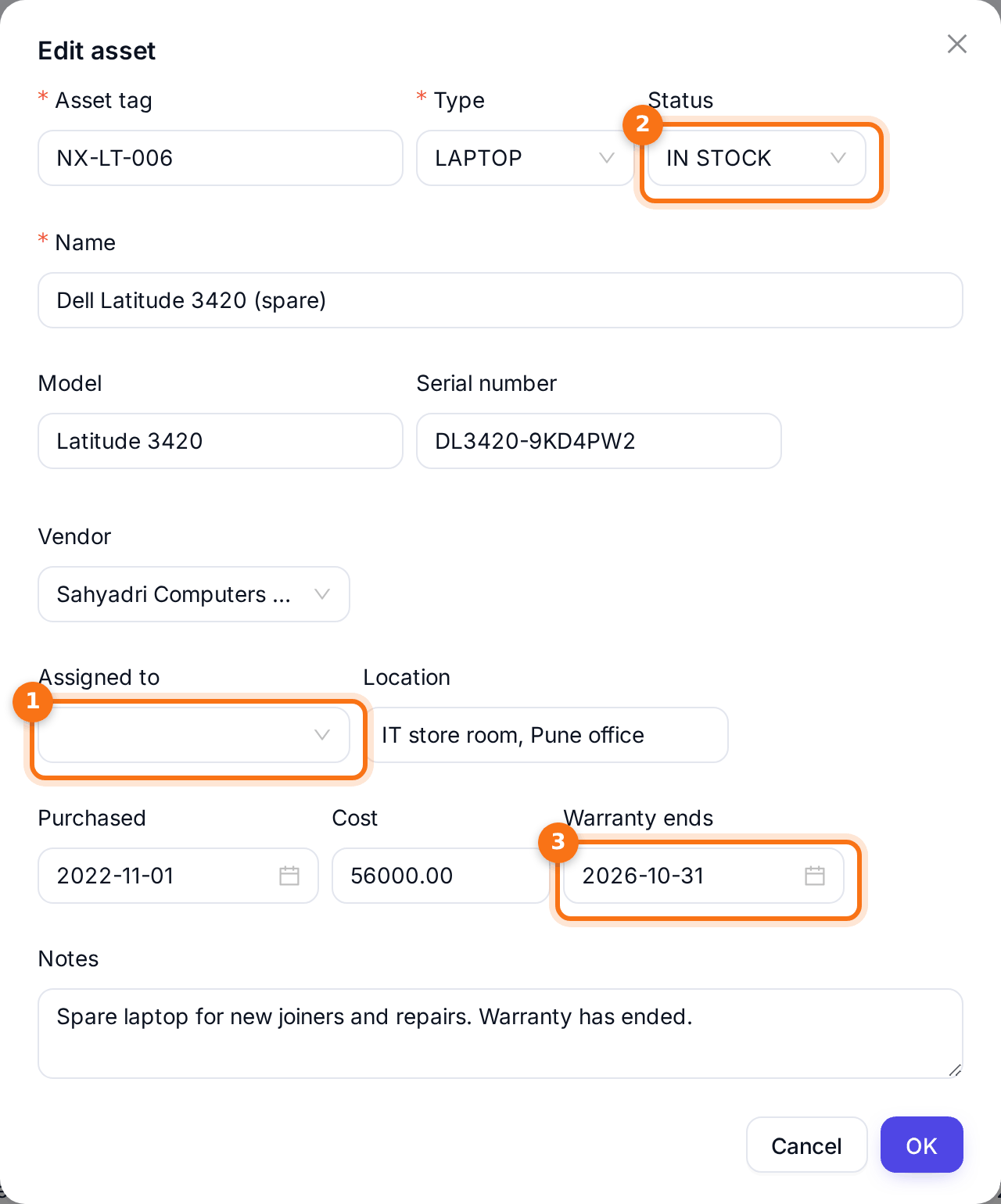
1 Assigned to. 2 Status. 3 Warranty ends. -
Choose the person in Assigned to 1.
- Set Status 2 to In use, or clear it so it's set automatically.
- Click OK.
To take an asset back, clear Assigned to with its ×, set the status to In stock and update the Location. Every change of assignee and status is recorded in the audit log; administrators see it in Administration → System → Audit trail.
When a device goes for repair, set its status to In repair and add the repair reference in Notes. The dashboard counts assets in repair.
Track warranties
- On the IT operations dashboard, the Warranty expiring tile counts assets whose warranty ends in the next 30 days.
- In the register, tick Warranty ≤ 30 days to list them.

For each one, decide whether to extend the warranty, renew the licence or plan a replacement, and note the decision in Notes. To record an extension, change Warranty ends to the new date.
Retire or dispose of an asset
When an asset is no longer used:
- Open the asset.
- Clear Assigned to. Retired and disposed assets can't be assigned to anyone.
- Set Status:
- Retired: taken out of service but still held by the company, for example waiting for disposal.
- Disposed: sold, scrapped or recycled. Only owners and administrators can choose it, and a disposed asset can't be brought back into use.
- Lost: missing or stolen.
-
Write the reason, date and who wiped the data in Notes, then click OK.

1 Status Retired. 2 The reason and data wipe recorded in Notes.
Assets are never deleted, so their history stays available.
Common questions
It says the asset tag or serial number is already in use
Tags and serial numbers must be unique. Search the register for the tag or serial; the device may already be registered, perhaps as retired.
My supplier isn't in the Vendor list
Vendors come from Customers → Companies. Add the supplier there first (see Customers and finance).
Can I see which assets a person has?
Each person can tick Mine to see their own assets. For someone else, look down the Assigned to column of the register.
Does IT ERP calculate depreciation?
No. The IT asset register tracks people, places and warranties. Depreciation belongs to the accounts team's fixed-asset register.