Project Management
Plan, run and report on projects of any kind, from software to construction and events. Start from a ready-made template, follow the work on boards and Gantt charts, run sprints, balance people's workload, log time, manage risks and approvals, and let an AI assistant suggest plans for you to review.

New to Project Management? Start with the tutorial Plan and run your first project. It takes you from an empty organisation to a running project in about 30 minutes.
How a project runs in BizzWeave ERP
The usual flow, from an idea to a closed project:
Where things are in the menu
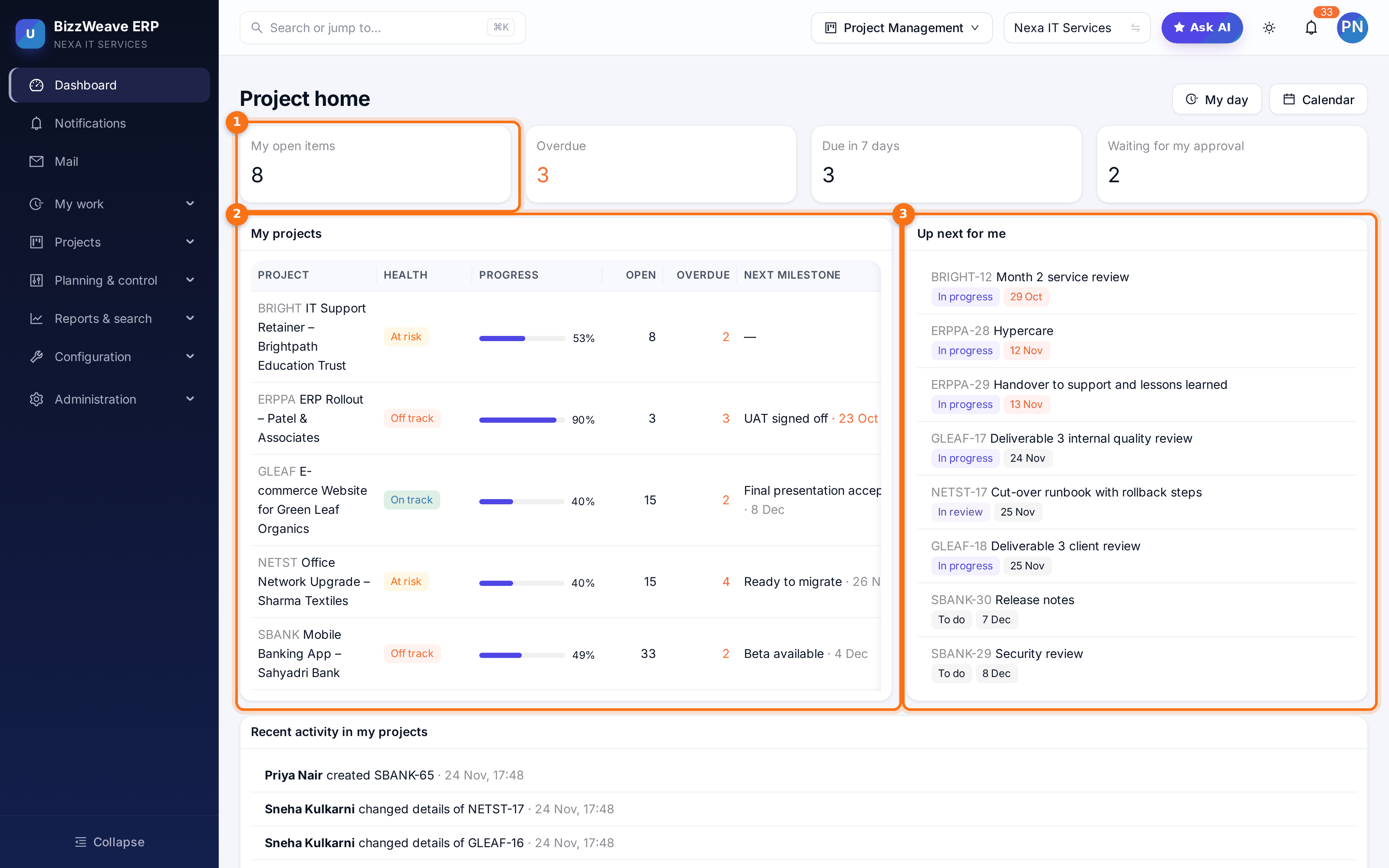
Choose Project Management in the category switcher at the top of the screen. The menu then has five groups. The Dashboard entry at the top opens Project home, with your open work, overdue items and the health of your projects.
| Menu group | What it holds |
|---|---|
| My work | Your own day: My day, Tasks, Calendar and Timesheet. |
| Projects | Projects and everything inside a project, plus Portfolio, Boards, Milestones, Sprints and Discussions. |
| Planning & control | Resources, Risks & issues, Escalations, Approvals and the AI assistant. |
| Reports & search | Project reports, Project dashboards and Search. |
| Configuration | Project templates, Workflows, Automation, Integrations, Custom fields and Item sets. |
Some entries appear only if your role allows them. For example, Workflows and Custom fields need the right to manage workflows, and a viewer sees projects but can't change them.
My work
Project home & My day
Your overdue work, what is due today and this week, and a timer to track time as you work.
Tasks
All your tasks across projects, with filters, bulk changes and saved views.
Calendar
Deadlines and milestones by month. Subscribe from Outlook, Google or Apple Calendar.
Timesheet
Your hours by week, submitted for approval, and approving your team's weeks.
Projects
Create a project
The project list, the template wizard, blank projects, CSV import, copying and archiving.
Project workspace
The project header, every tab at a glance, the Overview tab and starting or closing a project.
Tasks, board & tree
Add and open tasks, move them through the workflow, the Kanban board and the work breakdown.
Gantt & schedule
The Gantt chart, dependencies, auto-scheduling, baselines, phases and recurring tasks.
Team, access & settings
Project roles, visibility, workflow, lifecycle approvals and sharing with a client.
Budget
Budget versions, expenses, commitments and revenue in ₹, with earned value.
Documents & wiki
Project files with versions and review, and a wiki for the team's notes.
Change requests
Raise, approve and carry out changes to scope, schedule or cost.
Portfolio
All projects side by side, ranked, grouped into programmes, with a roadmap.
Boards
Kanban boards that span several projects.
Milestones
Key dates, exit criteria, gate approvals and the achievement report.
Sprints
Scrum teams, backlog, sprint planning, board, stand-up, review, retrospective and burndown.
Discussions
Channels, threads and announcements for each project.
Meetings & decisions
Minutes, action items that become tasks, and the decision log.
Planning & control
Resources
Workload heat map, allocations, skills, holidays and time off.
Risks & issues
The risk register with heat map, and the issue log.
Escalations
Overdue or stuck work raised automatically to the right people.
Approvals
Your approvals inbox, delegation while you are away, and approval policies.
AI assistant
Plans, risks, status reports and more, suggested by AI and applied only after a person reviews them.
Reports & search
Project reports
Key figures and 14 reports, exported to CSV, Excel or PDF.
Project dashboards
Personal and shared dashboards built from widgets.
Search
Find any work item with a query, save views, act on results and export.
Configuration
Project templates
The template library and your organisation's own templates.
Workflows
Design the states and steps a task goes through, with approvals.
Automation
“When this happens, do that” rules, with a test run and history.
Integrations
Slack, Microsoft Teams, GitHub, GitLab and e-mail.
Custom fields
Extra fields on tasks and projects, such as a client reference.
Item sets
Reusable sets of tasks, such as a launch checklist, added to any project.
Project home
When you choose Project Management, the Dashboard opens Project home. It shows your open items, what is overdue, what is due in the next 7 days and what waits for your approval, followed by your projects with their health, progress and next milestone.
Still have a question? See the Project Management FAQ.