Triage, assign and prioritise tickets
Triage means looking at each new ticket, deciding how urgent it is and who works on it. Do it as soon as tickets arrive: the first-response clock is already running.
Before you start
- You need the Work tickets permission (managers and owners have it).
- Time needed: under a minute per ticket.
The open queue
Open Service management → Service desk. The IT team starts on the Open queue tab: every ticket that is New, Open, In progress or Pending, newest first.
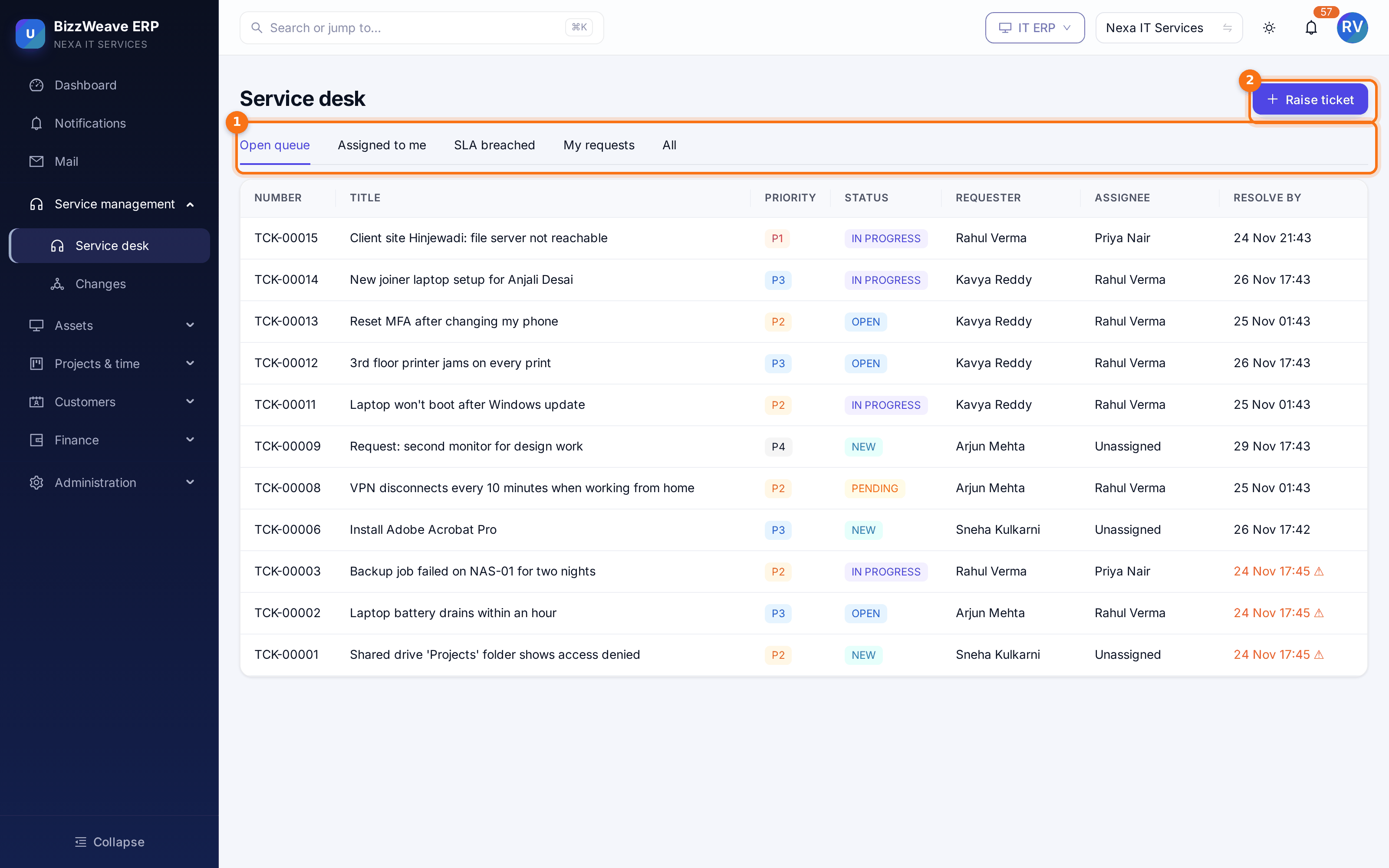
Unassigned tickets show Unassigned in the Assignee column. The list refreshes every minute.
Triage a new ticket
-
Click the ticket to open it on the right.

A new P4 ticket. 1 Status. 2 Priority. 3 Assignee. 4 Take it. -
Check the priority and change it in the priority list 2 if needed. Use this guide:
Priority Use it when Example P1 Many people, or a client site, can't work. Client site Hinjewadi: file server not reachable P2 One person can't work, or a deadline is at risk. Laptop won't boot after Windows update P3 Something is broken but there is a workaround. 3rd floor printer jams on every print P4 A request or minor issue. Second monitor for design work When you change the priority, the Respond by and Resolve by deadlines are recalculated from the time the ticket was raised, using the new priority's targets.
-
Assign it. Choose a person in the assignee list 3, or click Take it 4 to assign it to yourself. To remove the assignee, clear the list with its ×.
-
Set the status 1 to Open or In progress once someone is on it.
Every change saves at once and is added to Conversation & history, with your name and the time.
Assign only to people who can see tickets
The assignee list shows every member of the organisation. A person with the Member role can't open tickets raised by others, so assign tickets only to the IT team (in the example, Rahul Verma or Priya Nair).
What happens next
Moving a ticket out of New, or the first reply to the requester, counts as the first response for the SLA. The ticket now appears in the assignee's Assigned to me view.
Common questions
Can a ticket go to the right person automatically?
Yes. Give the ticket category a default assignee in Categories & SLA (see SLA targets). New tickets in that category are assigned to that person.
How do I raise a ticket for someone who phoned in?
Click Raise ticket and describe the problem. The ticket is saved with you as the requester; name the caller in Details.