Register in / out
The register records the physical and soft-copy documents that come into the office from clients and go back to them: a sale deed, two box files of bills, a signed ITR-V. If anyone asks “do we still have the original?”, the answer is one search away.
Before you start
- To record entries you need the Member role or higher. Everyone can see the register.
- Time needed: 1 minute per entry.
The register
Open Office → Register in / out. Each client's page also has a Register tab with that client's entries.
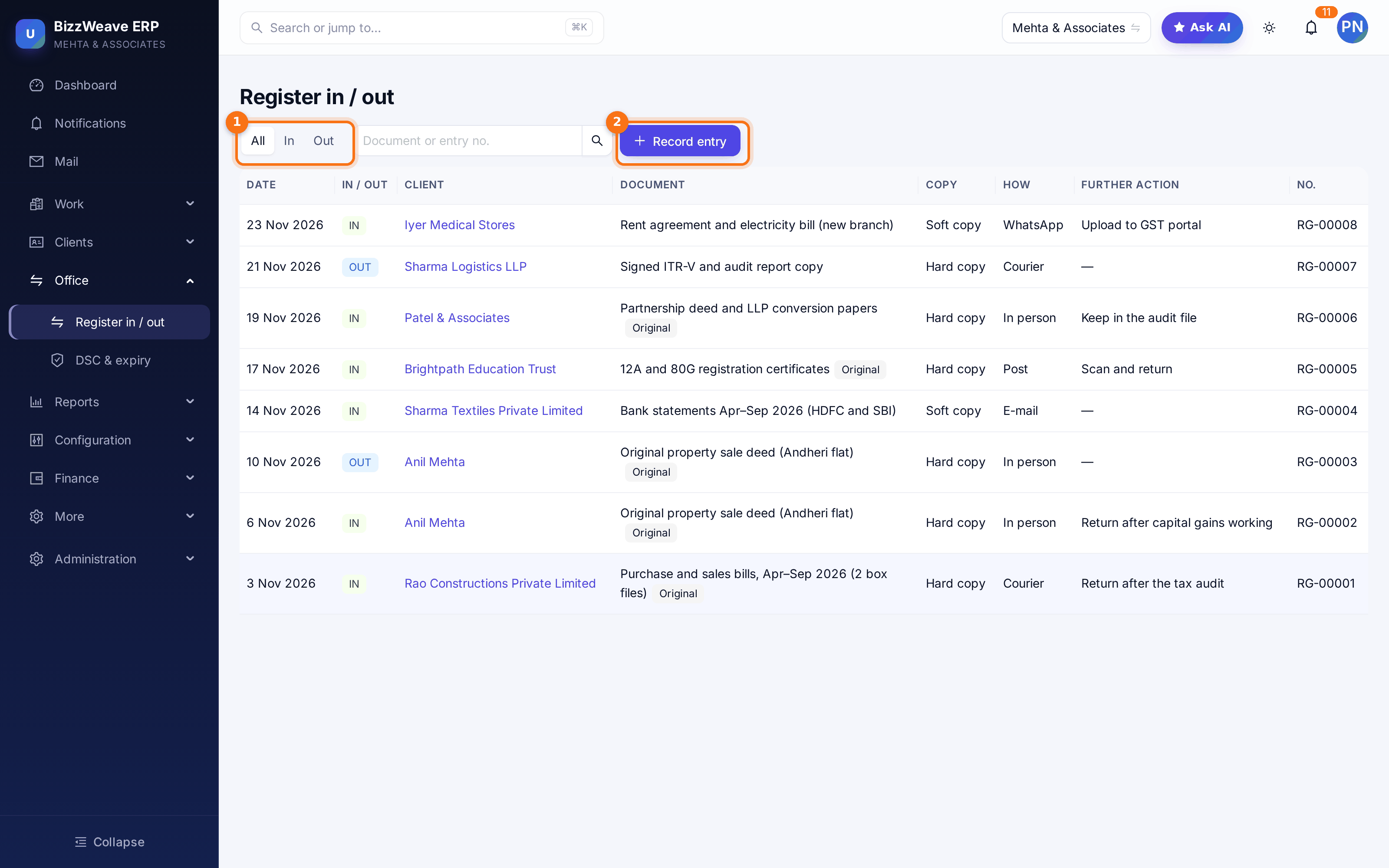
| Column | Meaning |
|---|---|
| Date | The day the document came in or went out. |
| In / out | Green IN = received from the client; blue OUT = returned or sent to the client. |
| Client | Click to open the client. |
| Document | What it is. An Original tag marks original documents. |
| Copy | Hard copy or soft copy. |
| How | In person, Courier, Post, WhatsApp, E-mail or Other. |
| Further action | What still has to happen, such as Return after the tax audit. |
| No. | The entry number, such as RG-00008. |
Use All / In / Out 1 and the search box (document or entry number) to find an entry.
Record a document
- Click Record entry 2.
-
Fill in the window:

Original stock register received from Patel & Associates. Field What to enter Client (required) Type to search. Date (required) Today by default; can't be in the future. In / out In when you receive it, Out when it leaves the office. Document (required) A clear description, for example Stock register and closing stock statement FY 2025-26. Copy, How Hard or soft copy, and how it came or went. Original document Tick it for originals, so they are easy to spot. Handled by Who received or handed it over. Empty = you. Further action, Description Notes for later. -
Click Save. The entry gets the next number.
When you return the document, record a second entry with Out, for example Original property sale deed (Andheri flat), OUT, in person.
To correct or remove an entry, click its row, change it and click Save, or click Delete.
Common questions
Does an OUT entry close the IN entry?
No. The register is a simple diary: each movement is its own line. Search for the document to see both lines together.