Change requests
When a client asks for something extra, or the plan has to move, raise a change request. It records what changes, why, and the effect on time and cost, gets it approved, and then updates the baseline and the budget for you.
Before you start
- Open the project and click the Changes tab.
- You need permission to raise change requests. Only the project's managers can Implement an approved change.
- Have the effect ready: how many days it adds and how much it costs.
- Time needed: about 3 minutes.
The change request list
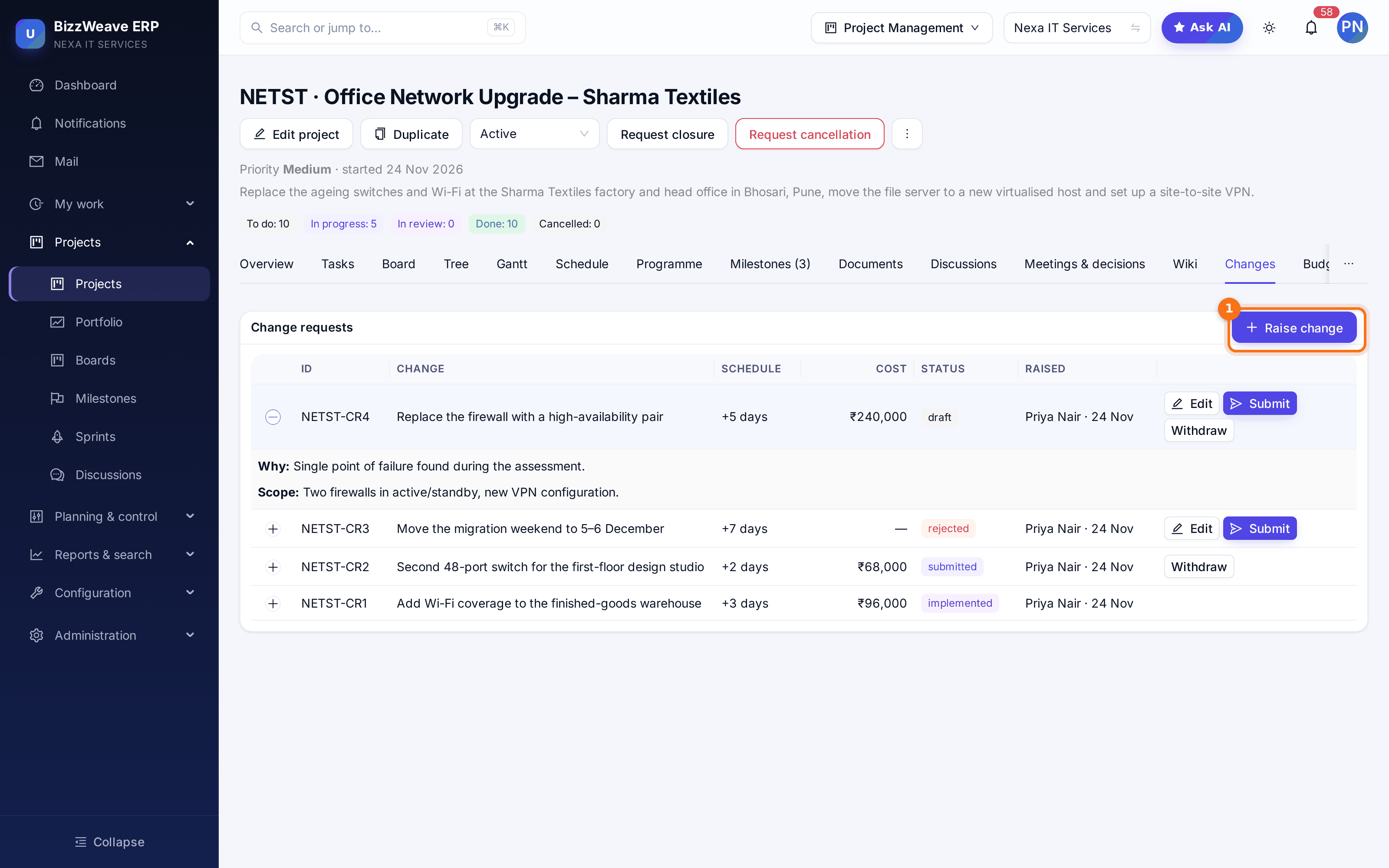
Each change request has an ID (for example NETST-CR2), the Change, its Schedule effect in days, its Cost effect in ₹, the Status and who Raised it and when. Click + at the start of a row to read the reasons and scope.
If change control is off for the project, a blue note says so. Change requests still work; turning Change control on in the project's Settings tells the team that scope, schedule and cost changes must go through them.
Status of a change request
| Status | Meaning | What you can do |
|---|---|---|
| draft | Saved, not yet sent. | Edit, Submit, Withdraw |
| submitted | Waiting for approval. | Withdraw |
| approved | Agreed; not yet applied to the plan. | Implement (project managers) |
| rejected | Not agreed. | Edit and Submit again |
| implemented | Applied: a baseline was kept and the budget updated. | Nothing; it is history |
| withdrawn | Cancelled before a decision. | Nothing |
Raise a change request
-
Click Raise change.

A change request to extend the guest Wi-Fi to the canteen. -
Fill in the window:
Field What to enter Example Change (required) A short title. Extend the guest Wi-Fi to the canteen Why The reason. Visitors and drivers wait in the canteen. Scope impact What is added, removed or changed. Two more access points and a guest VLAN. Schedule impact (days) Days added (or a minus number for days saved). 1 Cost impact (₹) Extra cost. An increase is added to the approved budget when the change is implemented. 42000 Details Anything else. -
Click Save draft.
- Click Submit on the row to send it for approval.
What happens next
The request goes to the Approvals inbox of the project manager. When the cost impact is above ₹5 lakh, a director must approve it as well. The person who raised the request can't approve it.
Implement an approved change
An approved change doesn't change the plan by itself. When you are ready to apply it:
- On the Changes tab, find the row with status approved.
- Click Implement.
The ERP then:
- saves a baseline of the current plan named After CR-n, so you can compare the plan before and after the change on the Gantt and schedule;
- for a cost increase, creates a new approved budget version with a line for the change, noted Approved through change request CR-n (see Budget);
- marks the request implemented.
Then update the tasks and dates for the new work in the project as usual.
Common questions
The client wants to move a date, but there is no extra cost. Do I still need a change request?
If change control is on for the project, yes: enter the days in Schedule impact and leave the cost at 0. It keeps a record of who agreed to the new date.
My change request was rejected. Can I try again?
Yes. Click Edit, change what the approver asked for, and Submit again. The rejection reason is in the approvals history.
Does implementing a change move my tasks?
No. It keeps a baseline and updates the budget. You change tasks and dates yourself afterwards.