IT ERP
Run the IT service desk with SLAs, keep a register of every laptop, server and licence, and control changes with an independent approval. Projects, timesheets, customers and invoices come from the shared BizzWeave ERP modules.

How IT ERP works
A typical IT problem travels through IT ERP like this:
Guides
Raise a ticket
Report an IT problem as an employee, follow it and confirm when it's fixed.
Triage and assign
Set the priority, assign the ticket or take it yourself.
SLA targets and escalation
Response and resolution targets per priority, ticket categories, and what happens on a breach.
Work, resolve and reopen
Replies, internal notes, statuses, closing and reopening tickets.
Ticket views
The open queue, your tickets, breached tickets and every ticket ever raised.
IT assets
Register laptops, servers and licences, assign them, track warranties and retire them.
Changes and releases
Plan a change, have someone else approve it, implement it and record the outcome.
Projects & time
Projects, tasks and timesheets for IT work, from the Project Management Suite.
Customers & finance
Client companies, vendors, invoices and expenses.
A day on the service desk
A worked example, from the morning queue to the evening change window.
IT ERP questions
Answers to the questions new IT ERP users ask most.
The IT operations dashboard
Choose IT ERP in the category switcher at the top of the screen. The Dashboard then shows IT operations: what needs your attention today.
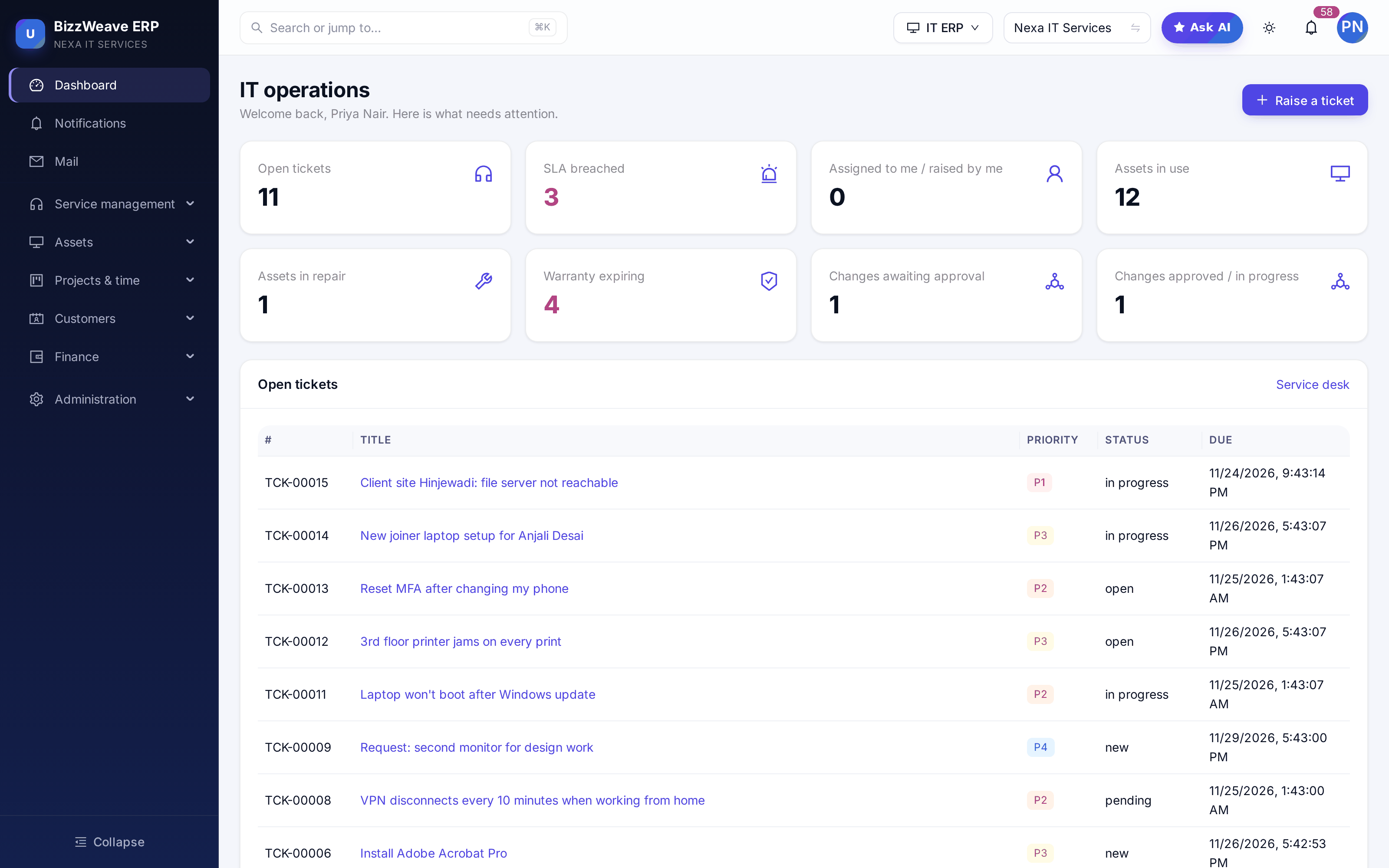
| Tile | What it counts | Who sees it |
|---|---|---|
| Open tickets | Tickets that are New, Open, In progress or Pending. | The IT team |
| SLA breached | Open tickets that missed a response or resolution target. Shown in red when above zero. | The IT team |
| Assigned to me / raised by me (IT team) or My open requests (everyone else) | Open tickets you raised yourself. | Everyone who can raise tickets |
| Assets in use, Assets in repair | Assets with that status. | Everyone who can see assets |
| Warranty expiring | Assets whose warranty ends in the next 30 days. Shown in red when above zero. | Everyone who can see assets |
| Changes awaiting approval, Changes approved / in progress | Changes in those stages. | Everyone who can see changes |
Click a tile to open the page behind it. Below the tiles, Open tickets lists the newest open tickets; an employee sees My open requests instead. Raise a ticket at the top right opens the service desk.
The IT ERP menu
| Menu | Pages |
|---|---|
| Service management | Service desk, Changes |
| Assets | IT assets |
| Projects & time | Projects, Tasks, Timesheet |
| Customers | Companies, CRM |
| Finance | Invoices, Expenses |

Who can do what
IT ERP uses your organisation's roles (Administration → Organisation → Roles & permissions). With the built-in roles:
| Role | Service desk | IT assets | Changes |
|---|---|---|---|
| Owner / administrator | Everything, including the Categories & SLA settings | Everything, including disposing of assets | Raise and run changes, and approve or reject them |
| Manager | Works every ticket: assigns, prioritises, replies, adds internal notes | Registers and updates assets | Raises, submits and runs changes |
| Member | Raises tickets and follows their own tickets | Views the register | Views changes |
| Viewer | No access | Views the register | Views changes |
Engineers who work tickets
A member can raise tickets but can't see anyone else's tickets, not even one assigned to them. If your engineers have the Member role, ask your administrator for a role that includes View all service-desk tickets (agent) and Work tickets, for example a custom "IT engineer" role. In the example company, Rahul Verma (manager) and Priya Nair (owner) work the service desk.